Try our 1-minute short audio summary of this blog on Customer Journey using CRM. 🎧
Your sales team closes a deal, everyone celebrates, and it feels like a job well done. Then a few months later, the customer quietly leaves, and you’re left wondering what went wrong. The problem is simple: most businesses focus only on the sale and ignore the overall customer experience.
A customer journey CRM helps you see what’s actually happening, and when you get it right, the results follow: companies that focus on the customer journey see around 25% higher revenue growth, especially when supported by tools like Office24by7 sales automation software.
In this guide, we’ll walk through how you can do the same, step by step. More importantly, each step is designed to be practical and easy to implement.
Tools like Office24by7’s sales automation software make it easier by capturing every customer interaction across channels, including integrations with cloud telephony services and WhatsApp CRM automation, so you’re building your journey maps on real actions, not assumptions.
- Why Customer Journey CRM Mapping Matters for Business Growth
- Understanding the 5 Customer Journey Stages in CRM
- Step 1: Collect Customer Journey CRM Data Across All Touchpoints
- Step 2: Segment Customers for Accurate CRM Journey Mapping
- Step 3: Visualise the Customer Journey Map in Your CRM
- Step 4: Automate Customer Journey Workflows in Your CRM
- Step 5: Measure, Optimise, and Refine
- Conclusion
Why Customer Journey CRM Mapping Matters for Business Growth
Most marketing teams still rely on assumptions about what they believe the customers are doing. They develop campaigns, prepare budgets, and construct funnels on assumptions. The issue is that assumptions are costly. When your message is not in line with where a customer is in their progress, you lose the lead and waste money.
A customer journey CRM transforms that altogether. Instead of guessing, you monitor actual customer touchpoints, starting with the initial search on Google and continuing through the final purchase and all of the interactions in between, supported by systems like lead tracker software and customer data management tools.
With all your customer data in one CRM, each of your teams, sales, marketing, and support, is operating off the same picture. As a result, this alignment minimizes unnecessary work, increases the conversion rate, and makes your ROI monitoring far more precise, especially when aligned with omnichannel marketing platform capabilities.

Related Reading
Understanding the 5 Customer Journey Stages in CRM
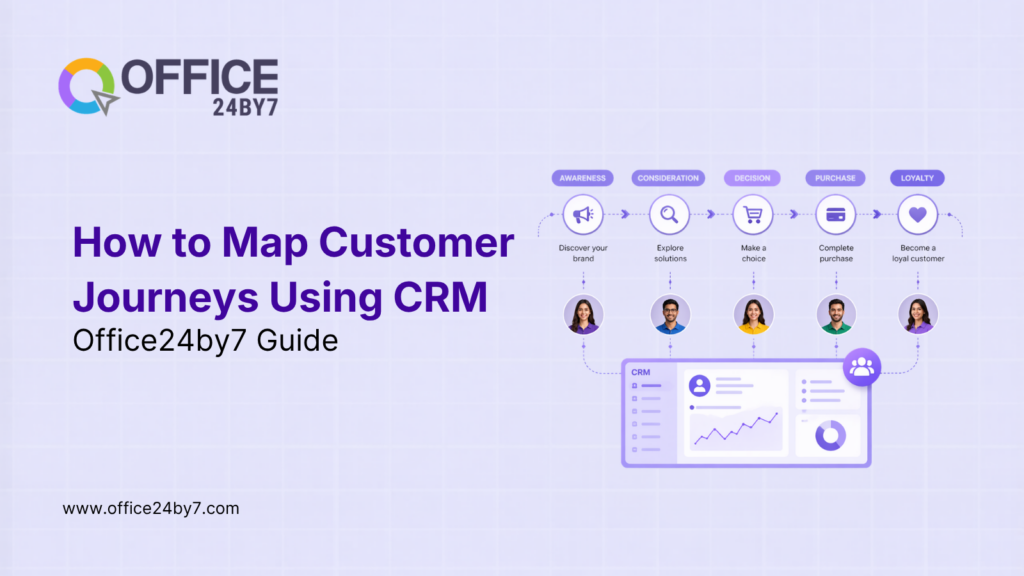
Before you map anything, you must understand the five stages every customer passes through. Every stage has touchpoints, its questions, and its own CRM triggers. This is what separates an effective customer journey map from something that simply looks good on paper.
Awareness Stage
It is at this point that the customer becomes aware that he or she has a problem or a need. They are yet to compare vendors and are conducting general searches on Google, blog posts, scrolling social media, or visiting industry events. This is visibility you are to do.
A customer journey CRM records the following initial indicators: web visits, content downloads, ad clicks, and even unidentified browsing behaviour until a lead completes a form. According to Digital Applied, B2B buyers complete 57% of their journey before ever contacting your sales team, which makes early tracking through lead generation software critical.
Consideration Stage
At this stage, the customer begins actively evaluating options. They go to your pricing page, case studies, and competition, and may even demand a demo. This is a high-intent stage, and it has to be tracked very accurately.
CRM should be used to track the number of pages that the customer has visited, the time spent on each page, and what is being downloaded, where even the time spent on key pages becomes an important signal. In the meantime, workflow automation helps you follow up effectively. It uses Office24by7 click-to-call software and supports personalized emails using email marketing tools. You can also set call alerts for your sales agents and share targeted case studies.
Decision Stage
The customer is willing to make a purchase, and at this point, time is of the essence, and details matter. All interactions should be recorded by your CRM system: all calls, all versions of the proposal, all objections, and how it was addressed.
Your sales agent must be capable of viewing the entire picture within less than 30 seconds of opening the CRM before making a final call, especially when integrated with Office24by7 cloud telephony services and call tracking software. Ultimately, it is important not to lose a deal just because somebody forgot to follow up.
Retention Stage
The journey does not stop with the sale. Onboarding progress, support history, usage patterns, and renewal conversations need to be monitored in your customer lifecycle.
If the engagement decreases, the CRM raises a flag prior to the customer leaving. At this point, timely intervention becomes critical, often enabled through a ticketing management system and a task management system.
Advocacy Stage
Customers who are satisfied become a channel of growth via customer advocacy. CRM must recognize advocacy indications, high satisfaction ratings, repeat purchases, and referral activity.
This can be further amplified using SMS marketing automation and a WhatsApp bot to trigger a referral request, testimonial request, or loyalty reward. As a result, satisfied customers naturally turn into growth drivers.
Step 1: Collect Customer Journey CRM Data Across All Touchpoints
A journey map will only be as good as the data. Your map will deceive you if your data is not complete or inaccurate. Therefore, this step focuses on ensuring that all customer interactions, across all channels, are centralized.
Identify Every Customer Touchpoint
Begin by identifying all the points of contact of a customer with your business.
These are the most common to take into consideration:
- Interactions on the websites, such as page views, form submissions, and downloads
- Email interaction, including opens, clicks, and responses
- Phone calls and meetings with your sales and support teams
Each of these is directly into your customer journey, and all of these should be gathered by your CRM platform, often integrated with mobile CRM for real-time tracking.
Integrate All Communication Channels
Collecting data only works when all your channels are connected to the CRM.
- Website analytics tracks visitor behaviour and page paths
- Email marketing platforms capture opens, clicks, and conversions
- WhatsApp Business API logs every customer conversation
- Voice call recordings and transcripts via cloud telephony services
- SMS campaign responses and engagement rates through SMS marketing automation
When combined, these channels give you a complete and unified customer view.
Ensure Data Quality
Once data starts flowing in, quality becomes the priority, and the report by Gartner in 2023 shows that 60% of CRM projects fail precisely due to inadequate data quality.
Clean duplicate records on a regular basis. Normalise information within groups. Erase old contacts. And implement automated validation rules, often supported by customer data management tools.
Step 2: Segment Customers for Accurate CRM Journey Mapping
Not all customers follow the same route. When you draw a line of one journey and superimpose it upon all, you will be wrong with most. This is why segmentation becomes essential.
Create Customer Personas & Behavioural Segmentation
Begin by categorizing your customers into customer personas, which are founded on industry, company size, job role, purchase behaviour, and previous interactions. Every persona should have its own journey map, often tracked using lead tracker software.
In addition to personas, segment by behaviour.
Your CRM must monitor purchase frequency, recency, and content consumption behaviour, and must automatically transfer customers between segments, often enabled through workflow automation.
Step 3: Visualise the Customer Journey Map in Your CRM
Now that you have clean data and your segments are in place, it is time to map the actual journey.
Mapping all the customer touchpoints to all five stages of the journey: awareness, consideration, decision, retention, and advocacy. At each phase, identify the most active channels, the content customers engage with, and the average time to convert using an omnichannel marketing platform.
All funnels leak. Think of all the steps and ask questions: when is the customer slowing down? What is the minimum level of conversion rate?
Now you clearly see where your customers are in reality moving along your sales funnel.
Step 4: Automate Customer Journey Workflows in Your CRM
A journey map informs you of what occurs. Automation ensures that the appropriate thing is done next, without delays or manual gaps.
Trigger-Based Automation
Real-time automations are triggered by a particular action by the customer.
This type of reaction cannot be done manually at scale, and triggered workflows react to what the customer actually did, often powered by drip marketing automation.
Multi-Channel Automation
The automation strategy must follow customers across channels.
- Email sequences triggered by user behaviour
- WhatsApp messages triggered by customer actions
- SMS reminders for customer engagement
- Automated task creation for your sales team using a task management software
This ensures consistency across every interaction.
Personalisation at Scale
Automation is not a good idea unless personalised.
CRM data enables you to personalise at scale using customer data, industry, role, purchase history, and behaviour, often executed through inbound and outbound marketing automation.
Step 5: Measure, Optimise, and Refine
Journey mapping is not a one-time project. Instead, it is a continuous process, and it develops with your customers.
Start tracking the most important KPIs: conversion rates, time to close, drop-offs, and customer lifetime value. These KPIs should be accompanied by customer acquisition cost and retention rate.
Use attribution models in your CRM in order to view your revenue-generating touchpoints, backed by the analytics dashboards.
A/B tests provide other routes of the journey. Small optimisation grows exponentially. The idea is to check your maps at least once a quarter as the customer behaviour changes.
Related Reading
Conclusion
Most of the journey maps fail, which are based on assumptions and not facts, and a customer journey CRM alters that.
The results are self-describing: companies that have charted journeys realize 24.9 percent greater revenue, better marketing ROI, and increased up/cross-selling revenue.
When you are not able to see your entire customer journey today, you are losing revenue.
Is Your Customer Journey Ready to Be Mapped with Real CRM Data?
Office24by7 provides you with everything the customer journey CRM aids: monitor each touch point, automate each step, and quantify precisely what drives revenue. Call us: +91-7097171717 or email us: sales@office24by7.com.
Visit www.office24by7.com, and let’s start building a journey that converts.